 Regionly
How to block a country on Shopify
Guides · Updated 2026-11-03
What Shopify can do on its own
Shopify does not have a setting that hides your storefront from visitors in a chosen country. What it does have are shipping zones: customers can only ship to countries that have a shipping rate. Removing a country from your shipping zones stops orders shipped there, but visitors from that country can still browse every page.
If your goal is only "don't sell to country X", shipping zones may be enough and cost nothing. If you also want those visitors to stop seeing your products and prices, or you get unwanted traffic from a country you never sell to, you need something that runs on the storefront.
Blocking visitors with an app
Country blocker apps add a small script to your theme (a theme app embed, so your theme code is not edited). When a page loads, the app looks up the visitor's country from their IP address and shows a block page instead of your store if the country is on your list.
With Regionly you pick countries to block, or switch to "allow only" and pick the countries you sell to. Blocked visitors see your own title and message.
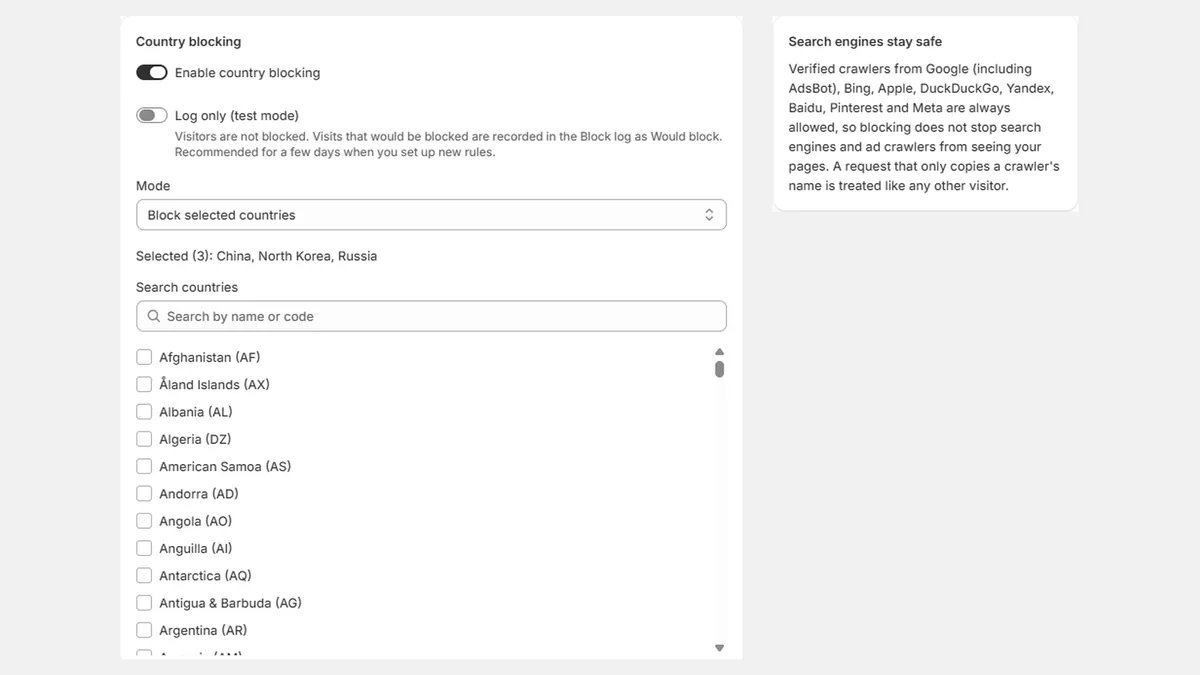
- Turn on Log only first: nobody is blocked, and visits that would be blocked are recorded so you can check the list is right.
- Use Check my setup to preview what a visitor from any country gets before you switch blocking on.
- Verified search engines stay in: Verified crawlers from Google (including AdsBot), Bing, Apple, DuckDuckGo, Yandex, Baidu, Pinterest and Meta are always allowed. A request that only copies a crawler's name is treated like any other visitor. Even so, don't block the United States if you rely on Google Search (see the SEO guide).
What country blocking does not stop
Storefront blocking runs in the visitor's browser through a theme app embed, so a determined visitor can get around it with a VPN, by turning JavaScript off, or by opening a direct checkout link. It is a filter for ordinary traffic, not a wall.
A first-time visitor from a blocked country can see your store until Regionly answers (in our tests from Thailand, 0.6 to 3.4 seconds). If you prefer, Strict mode hides the page for every visitor until the check finishes; in our mobile Lighthouse test it cost up to 4 points.
Orders can also skip the storefront entirely through direct checkout links. To stop those, the rule has to run at checkout itself: Regionly Pro adds checkout rules by shipping or billing country, email domain and phone prefix, including Shop Pay, Apple Pay and Google Pay.
Questions
Can I block a country on Shopify without an app?
You can stop orders shipped to a country by leaving it out of your shipping zones. Shopify has no built-in setting that hides the storefront from visitors in a country; that needs an app.
Will blocked visitors be able to get around the block?
Some will. A VPN, turning JavaScript off or a direct checkout link can get past a storefront block. Checkout rules (Pro) are harder to get around because they run inside Shopify's checkout.
Does blocking a country block Google?
Regionly lets verified search engine and ad crawlers through. Still, don't block the United States if you rely on Google Search: Google's crawlers come primarily from IP addresses in the United States, and Google recommends treating Googlebot like any other visitor from the country it appears to come from.
Regionly is a country blocker for Shopify with checkout rules (Pro). See it on the Shopify App Store or read the help and FAQ.