 Regionly
Does blocking countries hurt SEO?
Guides · Updated 2026-11-04
The short answer
Blocking visitors from a country you don't sell to usually doesn't affect your rankings, as long as Googlebot doesn't crawl your store from that country. Google's crawlers come primarily from IP addresses in the United States (Google's crawlers), and Google recommends treating Googlebot like any other visitor from the country it appears to come from (locale-adaptive pages).
So we don't recommend blocking the United States if you rely on Google Search. If Googlebot gets the block page, Google cannot see your products; and letting only Googlebot through while US visitors are blocked shows Google pages those visitors can't see, which goes against Google's recommendation and can be treated as cloaking.
Crawlers and blocked countries
Anyone can send a request that claims to be Googlebot, so an app should check the claim. Google recommends a reverse and forward DNS lookup or its published IP ranges (Verifying Googlebot). Regionly does this for each crawler it allows. Verified crawlers from Google (including AdsBot), Bing, Apple, DuckDuckGo, Yandex, Baidu, Pinterest and Meta are always allowed. A request that only copies a crawler's name is treated like any other visitor. Regionly lets verified crawlers through even from countries you block, so a crawler visiting from an unusual location is not blocked by mistake. That does not make blocking the US safe, for the reason above.
Blocked pages also get a noindex tag, so search engines are asked not to index the block page itself. Link preview bots that are not on the list (for example Slack or WhatsApp) follow your rules like normal visitors.
Page speed
By default Regionly does not hide the page for visitors your rules will likely allow, so they see your store at once. Strict mode hides every page until the check finishes (at most 1.5 seconds, then the page shows anyway); in our mobile Lighthouse test it lowered the score by up to 4 points. Leave it off unless the brief look at your store by blocked visitors matters more to you.
How to check after you set it up
- In Google Search Console, run URL Inspection on a product page and look at the rendered page.
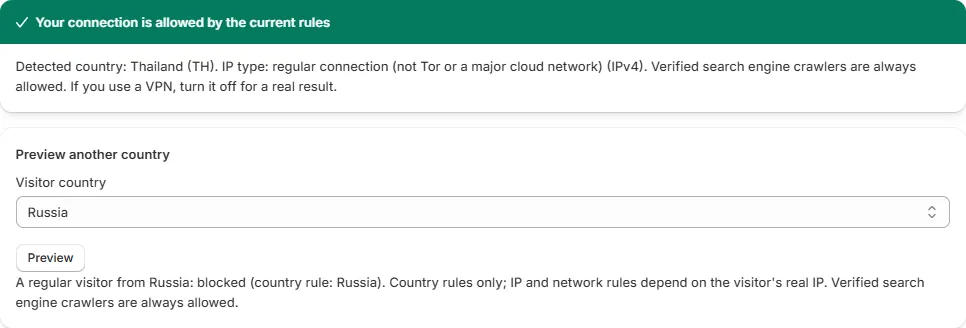
- In Regionly, use Check my setup to preview what a visitor from a blocked country gets.
- Start with Log only for a few days and look at the block log before blocking anyone.
Questions
Will Google penalize me for showing different content to some countries?
Blocking visitors from countries you don't sell to is common and usually doesn't affect search, as long as Googlebot doesn't crawl your store from those countries. Google's crawlers come primarily from IP addresses in the United States, and Google recommends treating Googlebot like any other visitor from the country it appears to come from. So avoid blocking the United States, and check your pages in Search Console.
Is it safe to block the United States?
We don't recommend it if you rely on Google Search. Google's crawlers come primarily from IP addresses in the United States, and Google recommends treating Googlebot like any other visitor from the country it appears to come from. Blocking the US can affect your search visibility, and letting only Googlebot through while US visitors are blocked can be treated as cloaking.
Regionly is a country blocker for Shopify with checkout rules (Pro). See it on the Shopify App Store or read the help and FAQ.